
![LinkedIn Premium vs LinkedIn Sales Navigator [2026 Comparison Guide] - Heyou](/learning-hub/sales-tools/linkedin-premium-vs-linkedin-sales-navigator/LinkedIn-Premium-Vs-LinkedIn-Sales-Navigator.png)
Table of contents
TL;DR
| Feature | LinkedIn Premium | LinkedIn Sales Navigator |
|---|---|---|
| Best For | Job seekers, networkers | Sales teams, power users |
| Core Strength | Visibility & insights | Lead generation & CRM workflows |
| Price | ~$29.99/mo | ~$119.99/mo+ |
| Ideal User | Individuals | Sales orgs & recruiters |
👉 Quick Verdict:
- Pick Premium if your goal is personal branding or job search.
- Pick LinkedIn Sales Navigator if you’re doing serious B2B prospecting.
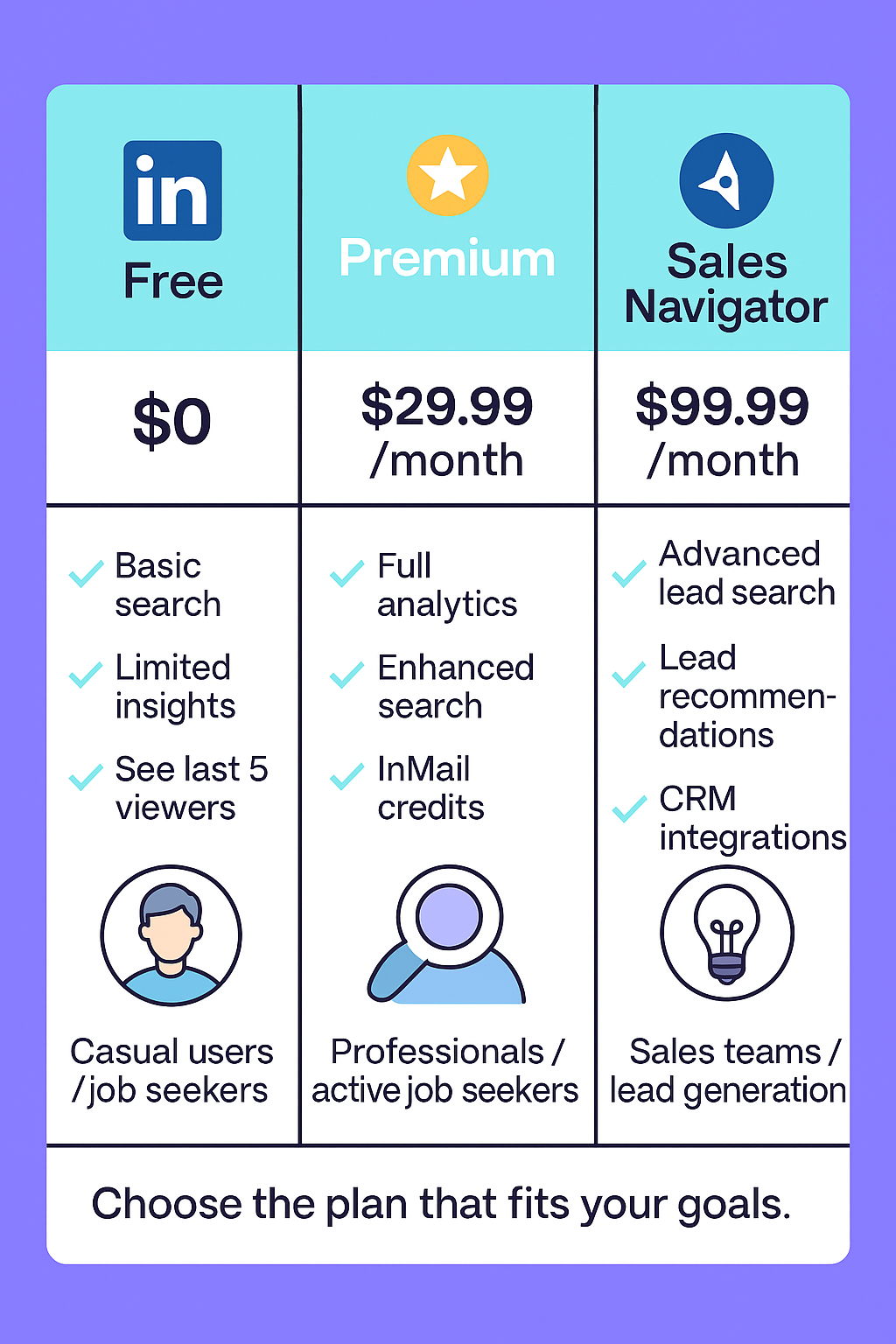
LinkedIn now offers several paid tiers, and for many professionals, it’s not always clear which plan actually delivers the most value. As a result, a lot of users end up overpaying for tools they don’t fully need—or subscribing to the wrong tier entirely.
At first glance, LinkedIn Premium and LinkedIn Sales Navigator appear similar, but they’re built for very different purposes. Premium is tailored for individuals focused on personal branding, job searching, and light networking, while LinkedIn Sales Navigator is designed for sales teams, recruiters, and power users who need advanced search, lead tracking, and CRM integrations.
But here’s the catch: not everyone fits neatly into either category. Freelancers, early-stage founders, and lean teams often need some outreach capabilities—but not the full complexity (or price) of Navigator. That’s where exploring alternative tools can make sense.
This guide breaks down LinkedIn Premium vs LinkedIn Sales Navigator side by side—features, pricing, and use cases.
What Is LinkedIn Premium?
Overview & Use Case
LinkedIn Premium is the platform’s entry-level paid subscription, built primarily for professionals, job seekers, and light prospectors who want to get more visibility, gain deeper insights, and unlock limited outreach capabilities beyond the free plan.
Unlike LinkedIn’s free tier, Premium gives you access to extra search visibility, InMail credits, and applicant insights, making it particularly useful for individuals who want to stand out to recruiters, analyze companies more strategically, or send messages outside their immediate network.
Key Focus Areas:
- Personal branding & visibility — see who’s viewed your profile, boost visibility to recruiters.
- Insights & analytics — view company growth trends, applicant data, and profile insights.
- Basic outreach — send InMails to people outside your network without needing a direct connection.
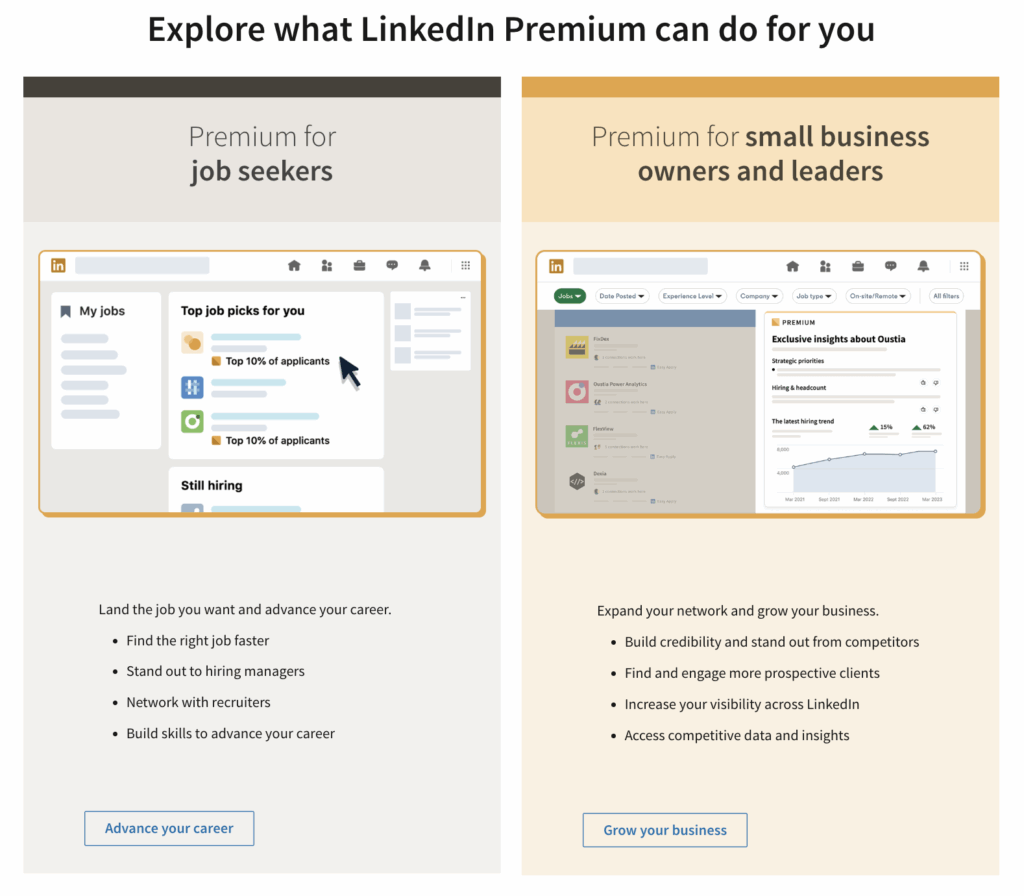
LinkedIn Premium Key Features
| Feature | Description | Why It Matters |
|---|---|---|
| InMail Credits | Send a limited number of direct messages (5–15/month depending on plan). | Lets you reach out to recruiters, prospects, or industry peers directly. |
| Who Viewed Your Profile | See a full list of users who have visited your profile in the last 90 days. | Helps you identify warm leads and interested recruiters. |
| Premium Insights | Get access to company growth data, employee distribution, and applicant stats. | Gives job seekers and networkers a competitive edge during outreach. |
| Applicant Rankings | For job seekers: see how you compare against other applicants. | Useful for tailoring resumes and improving your chances of being noticed. |
| Extended Search Visibility | View more profiles and search beyond your immediate network. | Expands your ability to find relevant people and opportunities. |
Pro Tip: LinkedIn Premium is particularly valuable during active job search or personal branding phases, but many users downgrade or cancel once their goal is achieved.
Types of LinkedIn Premium Plans (2025)
| Plan | Best For | Monthly Cost |
|---|---|---|
| Premium Career | Job seekers & professionals | ~$29.99 |
| Premium Business | Networkers & small business owners | ~$59.99 |
| LinkedIn Learning (sold separately) | Upskilling & professional development | ~$19.99–$39.99 |
Related: LinkedIn Premium Cost
What Is LinkedIn Sales Navigator?
Overview & Use Case
LinkedIn Sales Navigator is LinkedIn’s most advanced subscription plan, designed specifically for sales teams, recruiters, and power users who rely on LinkedIn as a primary prospecting and lead-generation platform.
While LinkedIn Premium focuses on personal branding and light outreach, LinkedIn Sales Navigator is built for scale — enabling users to search deeper, build targeted lead lists, track accounts in real time, and integrate seamlessly with CRM systems like Salesforce and HubSpot.
Key Focus Areas:
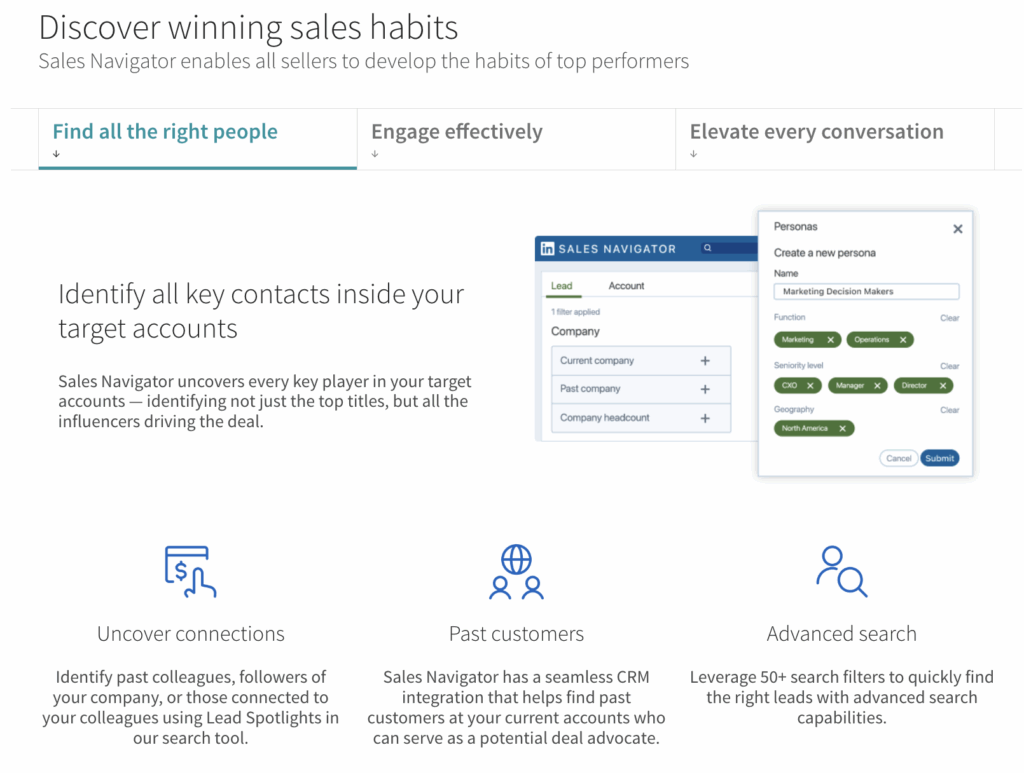
- Advanced Lead Generation — Identify and segment leads with granular filters.
- Sales Workflows — Save searches, set alerts, and monitor account activity.
- CRM Synchronization — Sync leads and activity with Salesforce, HubSpot, and other tools.
- Proactive Prospecting — Get recommendations, real-time alerts, and engagement signals.
LinkedIn Sales Navigator — Key Features
| Feature | Description | Why It Matters |
|---|---|---|
| Advanced Lead & Account Search | Filter prospects using 20+ advanced criteria like company size, function, seniority, geography, etc. | Enables highly targeted prospecting that goes far beyond LinkedIn Premium filters. |
| Saved Searches + Smart Alerts | Save search queries and get notified when new leads match your criteria. | Keeps your pipeline fresh without constantly searching manually. |
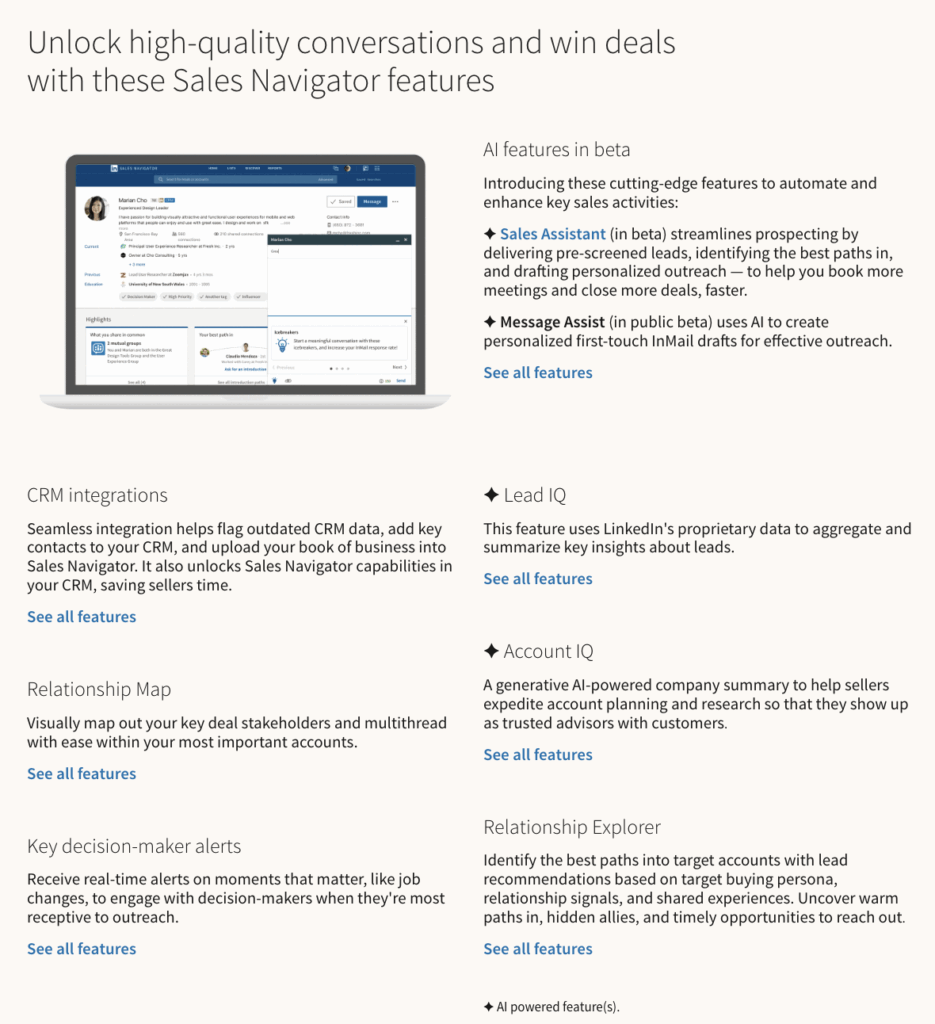
| CRM Integrations | Sync LinkedIn activity and leads with Salesforce, HubSpot, and other CRMs. | Streamlines workflows and prevents data silos between LinkedIn and sales tools. |
| Lead Recommendations | Get AI-driven suggestions for relevant leads and accounts. | Helps sales teams discover opportunities they might not have found manually. |
| Real-Time Account Tracking | Monitor job changes, shared posts, and engagement signals from target accounts. | Gives sales reps timely insights to act on buyer intent. |
Pro Tip: LinkedIn Sales Navigator isn’t just about finding leads — it’s about building a live, evolving pipeline directly inside LinkedIn.
LinkedIn Sales Navigator Plans (2025)
| Plan | Best For | Monthly Cost |
|---|---|---|
| Sales Navigator Core | Individual sellers, freelancers | ~$119.99 |
| Sales Navigator Advanced | Sales teams & recruiters | ~$159.99+ |
| Sales Navigator Enterprise | Large organizations | Custom pricing |
When LinkedIn Sales Navigator Makes Sense
- You work in B2B sales, recruiting, or business development.
- You need advanced filtering to find high-quality prospects.
- You use CRM tools and want LinkedIn activity integrated directly.
- You manage multiple accounts and need structured prospecting workflows.
When It Might Be Overkill
- You’re an individual job seeker or casual networker.
- You only send a few outreach messages each month.
- You don’t use CRM tools or structured sales processes.
- You prefer a lightweight, cost-effective outreach tool.
LinkedIn Premium vs LinkedIn Sales Navigator — Feature Breakdown
Choosing between LinkedIn Premium and Sales Navigator ultimately comes down to your goals and workflow. While Premium focuses on personal branding and light networking, Sales Navigator is built for advanced prospecting, structured sales pipelines, and team workflows.
Here’s a closer look at their core differences and a side-by-side feature comparison to help you decide.
Core Differences
| Aspect | LinkedIn Premium | Sales Navigator |
|---|---|---|
| Primary Purpose | Personal branding, job search, visibility | Advanced lead generation, sales workflows, CRM integration |
| Search Filters | Basic — limited to general criteria | Advanced — 20+ filters for precise targeting |
| CRM Integration | ❌ Not supported | ✅ Native integration with Salesforce, HubSpot & others |
| Alerts & Recommendations | ❌ Minimal | ✅ Real-time alerts & AI lead recommendations |
| Team Collaboration | ❌ Individual-focused | ✅ Built for sales teams and recruiters |
Quick Insight: Premium is best when your goal is to be discovered. Navigator is best when your goal is to actively discover others.
LinkedIn Premium Vs LinkedIn Sales Navigator
| Feature | LinkedIn Premium | Sales Navigator |
|---|---|---|
| InMail | ✔ (5–15 per month) | ✔ (more credits depending on plan) |
| Advanced Search | ❌ Basic filters | ✅ 20+ advanced targeting options |
| CRM Integration | ❌ Not available | ✅ Salesforce, HubSpot, etc. |
| Alerts | ❌ Limited | ✅ Real-time lead & account alerts |
| Job Insights | ✅ Detailed applicant & company insights | Limited, not the primary focus |
Pricing Comparison
Pricing is often the deciding factor when choosing between LinkedIn Premium and LinkedIn Sales Navigator. While Premium offers a more affordable entry point for individuals, Sales Navigator is positioned as a higher-tier tool for serious sales workflows and team use.
Here’s a detailed breakdown of their monthly and annual costs, along with trial availability as of 2025:
| Plan | Monthly Cost | Annual Cost |
|---|---|---|
| Premium Career | $29.99 | $239.88 |
| Premium Business | $59.99 | $575.88 |
| Sales Navigator Core | $119.99 | $1,079.88 |
| Sales Navigator Advanced | $159.99 | $1,799.88 |
Sources: Pricing verified as of June 2026 against LinkedIn's official plan pages — LinkedIn Premium and Sales Navigator. Sales Navigator Advanced Plus is enterprise-tier and quoted on request.
Pro Tip: LinkedIn often offers discounted rates for returning users or extended trials during promotional periods. Check your account dashboard or email offers before subscribing.
Key Takeaways
- Premium Career is the most budget-friendly option for individuals focused on job searching and visibility.
- Premium Business offers better search visibility for networkers and small business owners.
- Sales Navigator Core & Advanced come at a significantly higher price point but deliver enterprise-grade prospecting tools, making them ideal for sales teams and recruiters.
- All major plans typically offer 1-month free trials, so you can test before committing.
Use Cases — Which One Fits You Best?
Deciding between LinkedIn Premium and Sales Navigator often depends less on price and more on your goals and how you use LinkedIn. Each plan is designed with a different type of user in mind. Below is a clear breakdown of the scenarios where each makes the most sense:
Choose LinkedIn Premium If You:
- You are actively job hunting and want to stand out to recruiters. You want to streamline applications instead of submitting each one manually.
- You want to build personal visibility and grow your professional network strategically.
- You need insights more than outreach scale, such as company data, applicant comparisons, or profile analytics.
- You only send occasional InMails and don’t require advanced sales workflows.
- You prefer a simple, lightweight tool that’s easy to manage individually.
Best suited for: Professionals, job seekers, networkers, consultants, and individuals focused on personal brand growth.
Choose Sales Navigator If You:
- You work in B2B sales or recruiting, where LinkedIn is your primary prospecting channel.
- You need deep lead lists and alerts to track prospects, accounts, and job changes in real time.
- You use CRM workflows (e.g., Salesforce, HubSpot) and want LinkedIn data synced directly into your sales process.
- You require advanced filtering to find specific buyer personas or candidates.
- You operate as part of a sales team or recruiting agency, needing collaboration and scalable prospecting.
Best suited for: Sales teams, recruiters, business development representatives, founders doing outbound, and agencies that rely on LinkedIn for pipeline generation.
Pros and Cons Summary
Both LinkedIn Premium and Sales Navigator have distinct advantages and trade-offs. Understanding these helps you choose the plan that best aligns with your goals and workflow.
LinkedIn Premium
Pros:
- Affordable entry point compared to Sales Navigator
- Excellent for personal branding, job seekers, and visibility
- Simple and easy to use for individuals
Cons:
- Limited search filters and targeting capabilities
- No CRM integration
- Not designed for large-scale sales workflows
Sales Navigator
Pros:
- Advanced targeting and lead search capabilities
- CRM-ready with integrations for Salesforce, HubSpot, and more
- Scalable for teams, recruiters, and structured sales processes
- Real-time alerts and recommendations for proactive outreach
Cons:
- Higher cost, especially for advanced plans
- Steeper learning curve than Premium
- May be excessive for individuals with simple networking needs
Quick Questions
Is LinkedIn Premium worth it for sales?
LinkedIn Premium is suitable for light prospecting and personal branding, but it lacks advanced search filters and CRM integrations. For serious sales workflows, Sales Navigator is the better fit.
Can you use both Premium and Sales Navigator?
No. You can’t hold both subscriptions simultaneously on the same account. Sales Navigator includes most Premium features, so upgrading typically replaces Premium rather than stacking.
Is Sales Navigator only for large teams?
No. While designed for sales organizations, freelancers, recruiters, and small teams can also benefit from its advanced filters and lead tracking—provided the cost aligns with their budget.
Conclusion — Choose the Right Tool for Your Goals
Both LinkedIn Premium and LinkedIn Sales Navigator offer powerful advantages, but they’re built for different types of users. Premium is ideal for individuals focused on personal branding, job searching, and light networking, while LinkedIn Sales Navigator is tailored for sales teams, recruiters, and professionals who need advanced targeting, CRM integration, and structured outreach workflows.
The key is to align your choice with your specific goals, workflow, and budget. Test the available free trials, compare real use cases, and pick the tool that will give you the best return on time and investment.